Placement
Placement is how you position one cell, shape, or array within another. The pattern is always the same:
c.Place(thing).at((x, y))Place(...) selects an already added object and returns a PlacementChain; selection alone does not move it. Positioning and transforms mutate that original handle. Keep the c.add(...) result when you need ports, bounds or promotion.
The chain
For a placed cell reference, these operations resolve as follows:
at((x, y))sets the target for the selected child anchor (the center by default).rotate_by(angle)rotates counter-clockwise about the placed reference’s center.move_by(dx, dy)adds a shift in the parent cell’s coordinates.flipX()reflects in parent X (across Y);flipY()reflects in parent Y (across X). Flips preserve the selected placement anchor. Direct handle flips preserve the handle center.
"""The placement chain for cell references: at, move_by, rotate_by.

Every `c.Place(thing)` returns a chain. For references, `move_by` is a
parent-coordinate shift regardless of whether it precedes `rotate_by`.
"""
import lumicron as lm
import lumicron.pdks.elyon_demo.all as pdk


@lm.pcell
def PlacementChain():
    c = lm.CELL("PlacementChain")

    pad = lm.CELL("PlacementPad")
    pad.add(lm.Rectangle(x_dim=60, y_dim=60, layer=pdk.LAYER.MTL1))

    # 1. Plain placement.
    first = c.add(pad)
    c.Place(first).at((0, 0))

    # 2. Place + rotate 30°. The rotation is about the reference center.
    second = c.add(pad)
    c.Place(second).at((150, 0)).rotate_by(30)

    # 3. Place + rotate 90° + nudge by (10, 5) µm.
    third = c.add(pad)
    c.Place(third).at((300, 0)).move_by(10, 5).rotate_by(90)
    return c


if __name__ == "__main__":
    PlacementChain().to_gds("placement_chain.gds")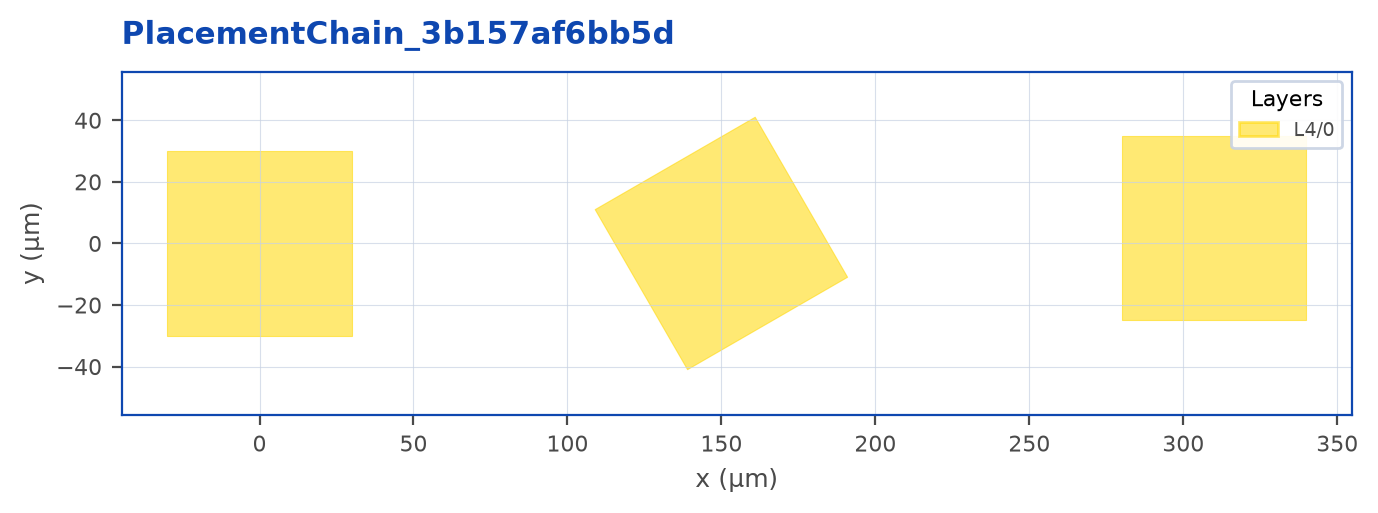
Note
For a cell reference, move_by accumulates and is applied after the placement target is resolved, regardless of whether you call it before or after rotate_by. The shift does not rotate with the reference. Rotations and reflections apply in call order for references, arrays, shapes, and groups; they do not commute. The stored GDS representation still applies local reflection, rotation, then translation, but its coefficients encode the requested parent-axis operations.
Anchors
For sub-cells, you usually want to place by an edge or corner of the child, not the child’s origin. using(...) switches the placement reference to a named anchor:
chip.Place(modulator).using("W").at((100, 50))"W" (west), "E", "N", "S", "NE", "NW", "SE", "SW", and "C" are all valid. The cell’s bbox supplies each anchor.
Selector, resolved point, or composite anchor
These three forms express different intentions:
c.Place(ref).using("SW").at((500, 0))
c.Place(ref).using(ref.SW).at((500, 0))
c.Place(ref).using(ref.ports["o1"], "S").at((500, 0))"SW"is a semantic selector. It resolves the mover’s current transformed physical bounding box, including after a rotation or reflection. Cardinal anchors use the parent cell’s axes at every angle.ref.SWis a resolved parent-coordinate point.using(point)captures its offset from the mover’s current origin. It moves that captured point to the destination; it does not remember which object/property produced the tuple. Thususing(other.SW)deliberately translates the mover bydestination - other.SW, leavingotherunchanged. Later rotations do not turn that snapshot into a dynamic selector.using(ref.ports["o1"], "S")takes X from the mover’s port and Y from its south bbox edge. The mover’s own port is refreshed by name through transforms. Both coordinates reach the requested destination. Other supported selectors are bbox names, existing port names, and finite resolved points. Tuples are not normalized UV coordinates.
Selecting an anchor alone preserves the current position. With an existing destination, changing the anchor re-applies that destination to the new anchor. Oblique bounds use a private rendered-geometry snapshot; this can cost more than a cardinal bounds query.
A direct reference rotate() or flipX()/flipY() retains its established pivot: the transformed definition-box center. A fresh Place(ref) with no positioning constraints preserves that direct behavior. Explicit using("C") selects the center of the current parent-axis physical bbox. For asymmetric oblique geometry those two centers can differ.
Differently sized MZIs
for i, delay in enumerate([40, 80, 140]):
    ref = c.add(PackagedMZI(delay=delay))
    c.Place(ref).using("SW").at((254.0 * i, 0.0))
Each MZI puts its own southwest bound on the row, despite different delay-arm heights. To put its input port on the column while preserving the same south edge:
c.Place(ref).using(ref.ports["o1"], "S").at((254.0 * i, 0.0))The complete illustrative MZI, packaging, hierarchy and DOE scripts are in Examples/Phase8LayoutAPI/vnext. Their geometry is an API acceptance fixture, not an optically qualified component.
Waveguides and transition cells participate in the same contract. Their bbox is derived from the rendered path/reference geometry, including bend bulges, even though those factories build model elements directly rather than ordinary builder handles.
You can also align directly to another handle:
chip.Place(electrode).right_of(modulator)   # electrode.W mates modulator.E
chip.Place(pad).above(electrode)            # pad.S mates electrode.N
Port names work as anchors too, and .at(...) accepts a port - so a placement can snap one port onto another:
chip.Place(wg).using("i1").at(bend.ports["o1"]) # translate: wg's i1 onto bend's o1Joining ports
For the everyday case - “connect this port to that port, touching” - use Join. It moves the first port’s cell (translating and rotating it so the two ports face each other) onto the second port, which stays fixed:
bl = c.add(bend90)
wg = c.add(straight_wg)
c.Join(wg.ports["i1"]).to(bl.ports["o1"])   # wg moves; its i1 mates bl's o1
Read the moving endpoint from a placed handle returned by c.add(). The fixed endpoint can come from another handle in the same cell or from c.ports["name"] on that cell. Ports from another cell cannot be used as the fixed endpoint. A cell-definition port does not identify which instance should move. A single array element cannot be moved independently of its array.
Join(a) creates a JoinChain without moving anything. .to(b) refreshes both instance ports, moves the first instance, records the paired endpoints, and returns that original instance handle. A successful request completes once. Invalid ownership, array connectivity, or joining an instance to itself is rejected before mutation. A rejected target may be corrected and retried. The established Join(a, b) form remains supported with the same completed result.
Join is a butt-joint: no geometry is drawn. To connect ports at a distance with a routed waveguide, use c.Route(...).
If the two ports disagree on width, layer, port type, or route profile, Join warns - that usually means the wrong ports are being mated - but it doesn’t fail, since deliberate cross-section changes at a junction are legitimate.
Arrays
ARRAY repeats a cell on a regular grid. It emits a single AREF in GDS - far cheaper than placing N copies, and edits to the child propagate to every instance.
"""ARRAY — repeat a cell on a regular grid.

`lm.ARRAY(child, count, pitch)` creates a periodic array reference. It
emits a single AREF in GDS — far cheaper than placing N copies, and
edits to the child propagate to every instance.
"""
import lumicron as lm
import lumicron.pdks.elyon_demo.all as pdk


@lm.pcell
def Pad():
    """A single 80 × 80 µm metal-1 pad."""
    c = lm.CELL("Pad")
    pad = lm.Rectangle(x_dim=80, y_dim=80, layer=pdk.LAYER.MTL1)
    c.add(pad)
    c.Place(pad).at((0, 0))
    return c


@lm.pcell
def PadStrip():
    """1×8 linear pad array on a 127 µm pitch."""
    c = lm.CELL("PadStrip")
    pad_array = lm.ARRAY(Pad(), count=8, pitch=(127, 0))
    c.add(pad_array)
    c.Place(pad_array).at((0, 0))
    return c


if __name__ == "__main__":
    PadStrip().to_gds("pad_strip.gds")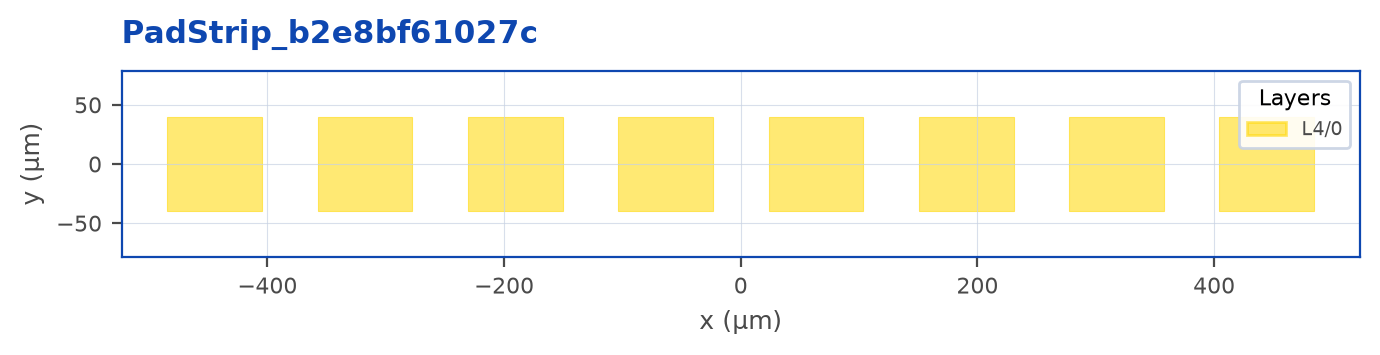
pitch is (dx, dy). Use scalar count=8 with (127, 0) for a horizontal strip or (0, 50) for a vertical column. For a rectangular grid use count=(nx, ny) and pitch=(dx, dy). A scalar count with both pitch coordinates nonzero is rejected. rotation= rotates each child; placement-chain transforms act on the entire compact array.
array[i] and array[column, row] inspect occurrence geometry/bounds. Occurrences have no public ports or promote() operation. Use separate c.add(child) placements for individually connectable devices. Historical serialized occurrence endpoints remain readable; new scripts do not manufacture them.
Hierarchy and re-use
Calling c.add(child_cell) multiple times creates multiple independent references (SRefs) - not duplicate geometry:
electrode_def = Electrode()                  # define once

left  = chip.add(electrode_def)              # SRef #1
right = chip.add(electrode_def)              # SRef #2

chip.Place(left).at((0, 0))
chip.Place(right).at((500, 0))
The GDS file contains one Electrode cell definition and two SRefs pointing at it. Edit electrode_def’s contents and both placements update.
Promoting child ports
If Modulator has ports i1 and o1, and your top-level Chip wants to expose those for an outer cell to route into, use handle.promote():
mod = chip.add(modulator_cell)
chip.Place(mod).at((0, 0))
mod.promote(ports=["i1", "o1"], prefix="mod_")
# Now chip.ports["mod_i1"] and chip.ports["mod_o1"] exist.
promote() accepts:
- A list of port names:
ports=["i1", "o1"] - A rename dict:
ports={"i1": "input", "o1": "output"} None(default) - promotes everything.
prefix= is optional and lets you avoid name collisions when multiple children have ports of the same name.
promote() copies the selected current transformed ports onto the immediate parent. It is not a live constraint: finish placement first. Deeper interfaces require explicit promotion at each boundary; promote does not expose every descendant. Name collisions fail before copying any ports. Registry discovery recursively finds registered DUT occurrences within the supplied root, separately from port visibility; see the Registry chapter.
Positioning order and returns
All placement modifiers return the same chain. using, at, relative_to, aligned_x, aligned_y, and the relational operation occupy independent slots; repeated writes to a slot replace its previous value. There is one relational slot: the last of above/below/left_of/right_of wins.
The target starts at relative_to(point) + at(offset) when a reference is supplied; otherwise at is an absolute parent-cell destination. Relations supply defaults: above mates S to N and centers X, below mates N to S, right_of mates W to E and centers Y, and left_of mates E to W. Thus their default spacing is edge-to-edge zero, using current transformed bounds. at adds an offset to a relational target; the relation’s orthogonal centering overrides the offset on that axis. Explicit anchor/reference/alignment slots override relational defaults. move_by accumulates and is applied last.
Transform order
Transform order matters: rotate_by and reflection do not commute. The at destination and cumulative move_by offset are reapplied after each transform. With a semantic selector and the same final transform, using("SW").at(target).rotate_by(angle) and rotate_by(angle).using("SW").at(target) have the same final bbox constraint. A captured resolved point does not have that promise.