Layers and design rules
Layers are the foundation. Every component, every route, every shape in your PDK will reference them by name, so naming and rule-tagging them well pays back on every script that uses your PDK.
The minimum
"""Defining layers with design rules and a LayerTable.

Each `lpdk.Layer` carries a (layer, datatype) pair plus optional design
rules. A `LayerTable` collects them with attribute access — the lookup
your end-users will reach for as `pdk.LAYER.SILC`.
"""
import lumicron as lm
import lumicron_pdk as lpdk

LAYER = lpdk.LayerTable(
    OXID = lpdk.Layer(1, 0, color="#87ceeb"),
    SILC = lpdk.Layer(9, 0, color="#008000",
                    min_width=0.2, min_spacing=0.2, min_radius=5.0),
    SILN = lpdk.Layer(5, 0, color="#ff69b4",
                    min_width=0.4, min_spacing=0.3, min_radius=10.0),
    MTL1 = lpdk.Layer(4, 0, color="#ffd700",
                    min_width=1.0, min_spacing=1.0),
)


@lm.pcell
def LayerSwatch():
    c = lm.CELL("LayerSwatch")

    # One swatch per layer to render the palette.
    for i, name in enumerate(["OXID", "SILC", "SILN", "MTL1"]):
        rect = lm.Rectangle(x_dim=120, y_dim=40, layer=getattr(LAYER, name))
        c.add(rect)
        c.Place(rect).at((i * 140, 0))
    return c


if __name__ == "__main__":
    LAYER.print_rules()
    LayerSwatch().to_gds("layer_swatch.gds")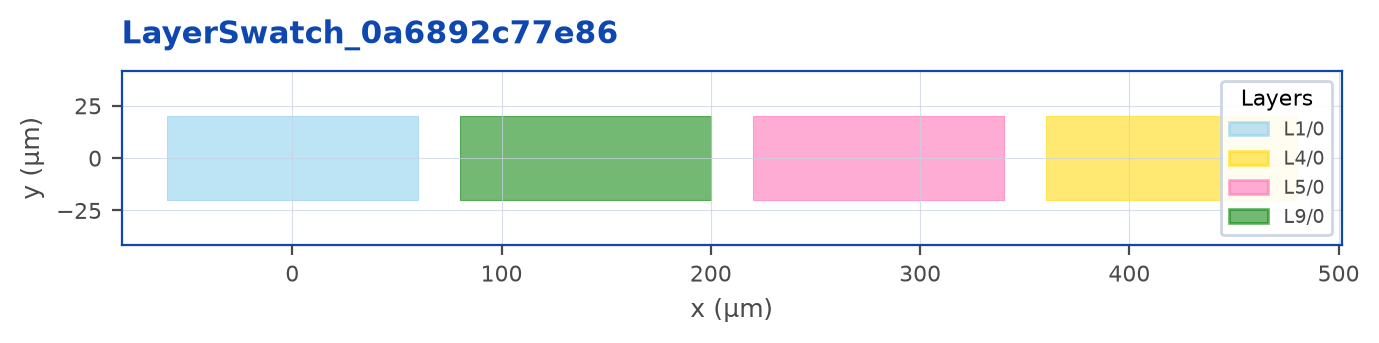
Two things this example introduces:
lpdk.Layer(layer, datatype, …)- aLayerSpecwith attached design rules. Use it anywhere the API takes aLayerSpec.lpdk.LayerTable(NAME=..., …)- collects layers into an object with attribute access. End users writepdk.LAYER.SILC; you writegetattr(LAYER, name)only when you must iterate.
Design rules
Layer can carry process guidance alongside its physical layer number:
| Field | Where it’s used |
|---|---|
min_width |
Minimum-width metadata; declare a named deck rule below for native DRC. |
min_spacing |
Minimum-spacing metadata; declare a named deck rule below for native DRC. |
min_radius |
Required minimum physical curvature radius; invalid rendered geometry can fail finalization. |
Add them as you have them - partial coverage is fine. These fields do not automatically create a native DRC deck.
SILC = lpdk.Layer(9, 0,
                color="#008000",
                min_width=0.2,    # 200 nm minimum body width
                min_spacing=0.2,  # 200 nm minimum spacing
                min_radius=5.0)   # 5 µm minimum bend radius
Tip
The color field is a single source of truth - it shows up in the Lumicron Mac viewer’s layers panel, in the figure renderer for documentation, and (when exported via LAYER.to_manifest()) in the .lumpdk JSON. Use the same color across all three so users don’t get confused by re-renderings.
Naming
Stick to short, all-caps names that describe the layer, not the use. SILC, SILN, MTL1, VIA1, OXOP - these compose well into longer identifiers (SILC_strip, MTL1_via1_stack). Avoid usage-coupled names like SHALLOW_RIB that lock the layer to one cross-section; profiles handle that.
If your foundry’s docs use names like LP1 or FOX, mirror those - your end users are reading the foundry datasheet alongside your PDK and dual-naming will burn them.
Datatypes
Datatypes are a foundry convention that lets you subclassify shapes on the same layer without minting new layer numbers. Common patterns:
- drawn = datatype 0
- exclusion = datatype 1
- fill = datatype 2
- identification text = datatype 99
If you publish multiple datatypes, give each a distinct entry in LAYER:
LAYER = lpdk.LayerTable(
    SILC      = lpdk.Layer(9, 0, …),
    SILC_EXCL = lpdk.Layer(9, 1, …),
)
Programmatic introspection
LAYER.print_rules() prints the table - useful in scripts users write while exploring your PDK:
SILC  L9/0   min_width=0.2   min_spacing=0.2   min_radius=5.0
SILN  L5/0   min_width=0.4   min_spacing=0.3   min_radius=10.0
MTL1  L4/0   min_width=1.0   min_spacing=1.0
OXID  L1/0
LAYER.to_layer_map() and LAYER.to_manifest() emit machine-readable forms - used by the .lumpdk packaging step (Chapter 7).
Stippling and borders
Choose the display beside the physical layer, inside LayerTable:
import lumicron as lm
import lumicron_pdk as lpdk

LAYER = lpdk.LayerTable(
    CORE=lpdk.Layer(1, 0, color="#8183FF",
        stipple=lpdk.Stipple.DIAGONAL_UP, opacity=0.35,
        border=lpdk.Border(color="#C4C5FF", width_px=2,
                         style="dashed", opacity=1)),
    CLAD=lpdk.Layer(2, 0, color="#58B89A", stipple=lpdk.Stipple.SPARSE_DOTS),
)
Fill opacity and border opacity are independent numbers from zero to one. border=None retains the ordinary solid outline. Use lpdk.Border(style="none") to hide it, or lpdk.Stipple.EMPTY for an outline without fill. Border color defaults to the layer color. Existing declarations without these options keep their defaults.
The collection below is available as lpdk.Stipple constants. Each mask bit occupies four drawable pixels in the native viewer; the catalogue enlarges the bits for reading.
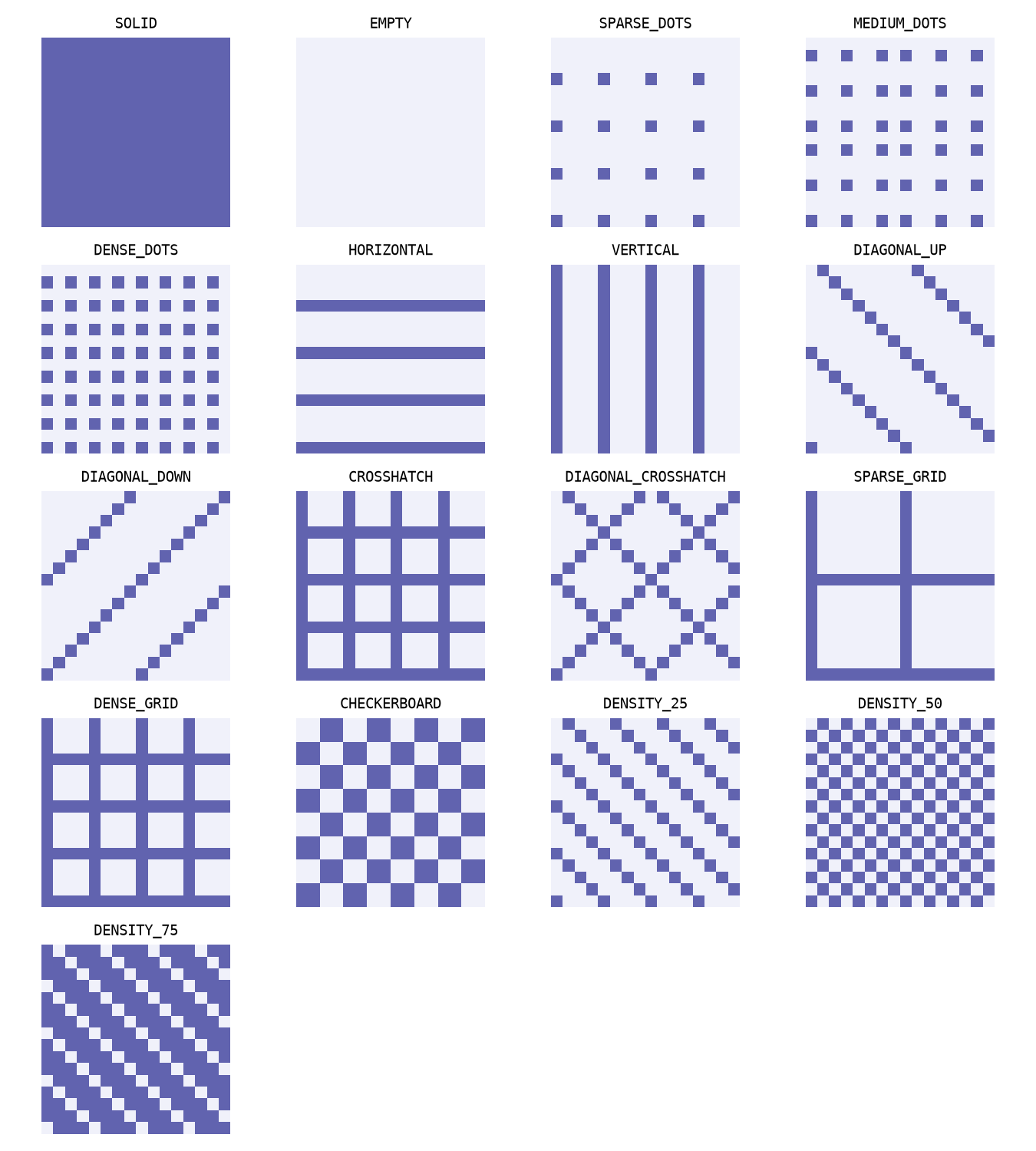
lpdk.Border accepts solid, dashed, dotted, dash-dot, or none. width_px is a positive drawable-pixel width up to 64. Named dash lengths are (6, 3), (1, 3), and (6, 3, 1, 3) respectively. These are display dimensions, not micrometers: they stay the same size while zooming. On a Retina display, two drawable pixels normally occupy one screen point. Dash distance follows each polygon contour, restarts for each contour, and does not depend on camera translation. Corners use a miter limited to four times the half-width; dash ends are flat.
Custom patterns and borders can be shared by several layers:
MY_STIPPLE = lpdk.Stipple(rows=(
    "*.......", ".*......", "..*.....", "...*....",
    "....*...", ".....*..", "......*.", ".......*",
))
MY_BORDER = lpdk.Border(width_px=2, dashes_px=(8, 3, 2, 3))
Masks require eight rows of eight * or # (on) and . (off) characters. Custom dash arrays require an even count of 2–16 positive, finite on/off lengths, each at most 4096 drawable pixels. Choose a named style or dashes_px, not both. Invalid declarations raise errors before packaging.
The Python declarations own the style. LayerTable.to_manifest() projects it into manifest.json; no separate display.json is needed. Existing JSON-only PDKs still work. If both sources declare the same layer, their complete display objects must be identical; conflicting declarations fail packaging. New stipple, opacity and border fields are excluded from geometry serialization and authored identity input. They travel with the PDK, not raw GDS or a standalone layout.
Validation rules
Author named DRC rules with lumicron_validate.drc. Export DRC from the PDK root so packaging includes its schema-v1 deck. See conventional rule authoring in the Validation API guide.
Layer mappings
lpdk.LayerMap owns name-to-layer mappings used by PDK and serialization workflows. Ordinary designers can use lm.LayerSpec(layer=1, datatype=0) for raw geometry or consume named layers from their environment. PDK authors define richer named layers through lpdk.LayerTable; validation-rule authoring remains in lumicron_validate.